

For a while now, I wanted something that would stop me shipping messy or risky code without realising it. I recently purchased a JetBrains subscription which comes with Qodana, a static analysis tool. This was great, as I could use the automated checks to help achieve my goal.
Note
As much as I’d like the extra income, this is not sponsored content.
So far, the hasn’t been a major issue in most cases as it just makes the code quality inefficient. However, it is possible for poorly maintained code to introduce subtle bugs that can reduce parity and the quality of the mod overall.
So I used the Qodana website to add a new workflow to my project and gave it its first run. I opened IntelliJ and started looking through the problems it had found with my code.
Unsafe Dependencies
The first thing I noticed in the report were the security issues. There are many vulnerable dependencies included in the project.
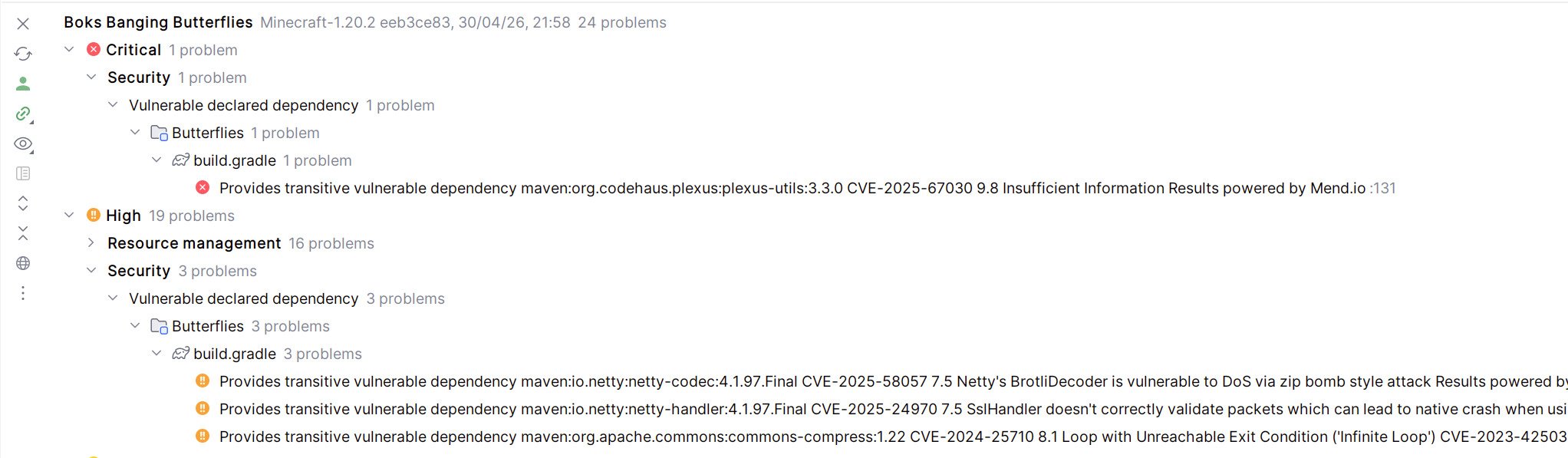
There is nothing I can do about these dependencies, as they all stem from the inclusion of the Minecraft jar, which is the main thing needed to use Minecraft’s code. These unsafe dependencies could exist because it’s an older version of Minecraft, or because Mojang hasn’t updated to the latest libraries yet.
Ultimately these dependency issues aren’t a problem I can fix myself. If/when they are fixed will be down to Mojang. So I can just ignore these and move on.
Redundant Code
The next set of problems it highlighted I found more useful. Unused imports are the bane of any Java programmer, and Qodana highlights all of them. This makes it easy to remove them all before you commit any pull request. It also spotted a couple of translation strings I no longer used, so I removed these as well.
Another thing it does is highlight duplicate code. This allowed me to create DirectionalBaseRenderer(), which would handle the rendering of all mobs that crawl on the sides of blocks (caterpillars, chrysalises, eggs). FinalizePossess() was added, which handles the last few steps of a Peacemaker Butterfly possessing a mob.
It also revealed a completely unnecessary method in the Butterfly Microscope code which tries to drop its inventory when it is broken by the player. Butterfly Microscopes don’t have an inventory, so I just removed the method.
You Don’t Always Need to Try
One problem that Qodana reported was:
'Level' used without 'try'-with-resources
Basically, Minecraft’s Level class extends AutoCloseable, which means its supposed to be used in a try-with-resources block every time it is accessed. This means the resource will automatically be released when it is no longer needed.
However, due to the way that Minecraft’s and Forge’s code work, this isn’t the case here. I tried using try-with-resources blocks whenever Level was accessed, and the game crashed when loading into a world. It seems that doing this causes the game to unload the level during load, hence the crash.
So this is another warning that should be ignored.
Updating My Workflow
If you’ve looked at my latest releases, you’ll notice the version numbers are all over the place. This is because I have my pipeline set up so that any time I push to a Release branch it will automatically publish to GitHub, CurseForge, and Modrinth. Qodana only runs when I push, but the Publish Action also runs as well.
When I discover problems with the code and fix them, I need to push them again. And in order to prevent version numbers clashing, I have to increase the version number. This ensures the newly published release doesn’t clash with other versions of that release.
The problem is that a lot of these fixes are things like removing unused imports, or extracting shared logic. Things that make the code more maintainable, but that also don’t add any new features.
CurseForge actually has a rule against creating releases with no new features, as it’s essentially “bumping” your mod to the top of the New Releases. Some modders try to spam releases so they will always be at the top, and they end up getting banned. What I’ve been doing with these latest releases isn’t that, but to CurseForge admins it doesn’t look any different.
So to prevent this I could just not push these minor fixes and keep them locally. But I don’t like the idea of doing that. The whole point of keeping a repo is so that you don’t lose code if you spill beer over your laptop. I needed to stop the Publish Action from triggering on every push.
So, in order to run the Publish Action only if the version number has actually changed, I check if the gradle.properties file for differences. Since that’s where I update the version number, the Publish Action won’t run if the version hasn’t been updated:
  # First check we have changed the version
  check_version_change:
    runs-on: 'ubuntu-latest'

    outputs:
      version_changed: ${{ steps.check_version_change.outputs.version_changed }}
    steps:
      - uses: actions/checkout@v2
        with:
          # Checkout as many commits as needed for the diff
          fetch-depth: 2
      - shell: pwsh
        id: check_version_change
        run: |
          # Diff HEAD with the previous commit
          $diff = git diff --name-only HEAD^ HEAD

          # Check if the gradle properties file has been changed
          $SourceDiff = $diff | Where-Object { $_ -match 'gradle.properties' }
          $HasDiff = $SourceDiff.Length -gt 0

          # Set the output named "version_changed"
          Write-Host "::set-output name=version_changed::$HasDiff"
          echo "version_changed=$HasDiff"

  build:
    # The environment where workflow runs, here Ubuntu latest stable
    runs-on: ubuntu-latest

    # Only run if the version has changed
    needs: [ check_version_change ]
    if: needs.check_version_change.outputs.version_changed == 'True'

    steps:
      # Steps to publish a release here.
This runs a checkout of the last two versions of the repo, and checks to see if there have been any changes to gradle.properties. It will output a variable (check_version_change.outputs.version_changed) which the original publish job will check before it runs.
Closing Thoughts
It’s still early days with this tool, but it’s already helped me tidy up my code in all Releases. So far it seems like its doing its job well, although there are some false positives. I can disable certain warnings if I need to, but I’m going to keep using the tool until I’m more used to it before I start doing things like that.
It also pushed me to improving the Publish Action, meaning I can now manage my code better in Release branches and not have to worry about publishing too many releases to CurseForge.
Static analysis has certainly helped me tidy up my code, but the biggest win here are the improvements to my pipeline. Tools don’t just fix code, they expose weaknesses in your workflow.


